Your photo

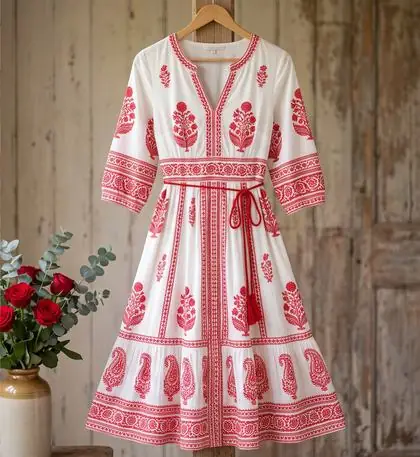
Garment
Your try-on
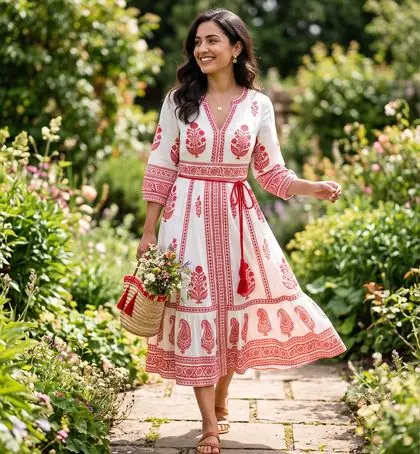 Example
Privacy first: your photos are used only to create your try-ons. They stay in your account until you delete them, and we never use them to train AI models or build biometric profiles.
See yourself in any outfit — your first try-on is on us.
No sign-up needed.
Try On Any Outfit with Attyre Virtual Try-On
Your AI clothes changer for real-life shopping — see how outfits and dresses may look on you, not just on a model.
Try our Chrome extension on any online store before you buy!
Start with available free try-on credits · No credit card required to start
How it works
How to Try On Clothes with Attyre AI
Try on clothes virtually in a few simple steps. Use the Chrome extension while shopping online or choose the Attyre web app for a dedicated virtual try-on experience.
01
Upload Your Photo
Choose your photo to preview an outfit on yourself.
02
Choose Your Outfit
Select a clothing product using our Chrome extension or upload a clothing image in the web app.
03
See Yourself in It
Get your AI-generated virtual try-on in seconds.
Option 1: Use the Attyre Chrome Extension
Step 1 — Open a Clothing Product
Visit an online clothing store, browse the products, and open the dress, shirt, jacket, or outfit you want to try on.
Step 2 — Start Attyre AI Try-On
Sign in to your Attyre account, click the Chrome extension, and select “Start Try-On.” Attyre automatically fetches the product image you’re viewing. You can also select “How Do I Look?” on the product image.
Step 3 — Upload Your Photo
Upload your photo to see how the selected clothing looks on you. Only upload another person’s photo when you have their permission.
Step 4 — Click “Try It On”
Click “Try It On” to generate your AI virtual try-on image in seconds.
Option 2: Use the Attyre Web App
Step 1 — Sign Up with Google
Sign up or sign in to Attyre using your Google account.
Step 2 — Open Your Attyre Dashboard
Access the Attyre web app to begin your virtual try-on.
Step 3 — Upload Your Photo and Clothing Image
Upload your own photo and select or upload the clothing product image you want to try on.
Step 4 — See Your New Look
Click the try-on option and let Attyre generate an AI-powered preview of the selected outfit on your photo.
Why Attyre
Why Choose Attyre AI for Virtual Try-On?
Preview outfits on your own photo, save time while shopping, and make more confident buying decisions with Attyre AI.
Save Time While Shopping
Preview clothes on your own photo and narrow down your choices faster.
Shop with More Confidence
See how an outfit looks on you before deciding whether to buy it.
Help Avoid Unwanted Returns
Make more informed clothing choices with an AI-generated preview before you order.
Explore More Styles
Discover and preview different outfits for work, weekends, and special occasions.
Share Your Looks
Share your try-on images with friends or on social media to get their opinions.
Frequently Asked Questions
What is Attyre AI Virtual Try-On?
Attyre is an AI-powered virtual try-on tool that lets you see how outfits may look on you before buying. Try it on the web or download the Chrome extension to use it while shopping online.
How does Attyre virtual try-on work?
Upload your photo, select a garment or outfit, and let Attyre generate an AI-powered virtual try-on so you can preview how it may look on you.
Is Attyre free to use?
New users receive free try-on credits. Additional try-ons may require purchasing credits. Check the extension for the latest available offer.
Do I need to download an app to use Attyre?
No. You can access Attyre through its website or download the Chrome extension for a convenient virtual try-on experience while shopping online.
How can I get started with Attyre?
Visit attyre.ai or download the Attyre Chrome extension to get started.
Can I use Attyre on any e-commerce website?
Yes! You can use Attyre on any e-commerce website. With your existing profile photos, you can use the Chrome extension to try on outfits.
Is my photo safe?
Your data is securely stored and only you can access and delete it.
Does it work for men's clothing too?
Yes! Attyre works for both men's and women's clothing and is recommended for users aged 18 and above.
Can I try on clothes using my own photo?
Yes, you can upload your own photo to preview how selected clothing may look on you using Attyre AI.
Can I try on clothes without manually uploading the product image?
With the Attyre Chrome extension, you can open a clothing product and select “Start Try-On” to fetch the product image automatically.
Can I save my virtual try-on images?
You can save your favorite virtual try-on images to revisit your outfit ideas later.
Can I share my virtual try-on images with friends?
You can share your virtual try-on looks with friends or on social media to get their opinions on different outfits.
Does Attyre AI show exactly how clothes will fit me?
Attyre generates an AI-powered preview to help you visualize clothing on your photo. The preview does not guarantee the exact fit or appearance of a garment in real life.
Can I use Attyre AI on my phone?
You can access the Attyre web app through a supported mobile browser. The Chrome extension is designed for desktop Chrome.
Dress for every moment — without leaving your browser.
attyre.ai · Works with Chrome